
How to Track Portable Generators with GPS
Michael Bar
Portable generators are valuable assets but are often at risk of theft, costing businesses significant amounts annually. GPS tracking offers a reliable way to monitor and protect these generators, with benefits including theft prevention, maintenance optimisation, and accurate usage tracking. For example, businesses have recovered stolen generators worth tens of thousands of pounds within hours using GPS trackers.
Here’s what you need to know:
- Key Features: Choose trackers with real-time location updates, engine hour monitoring, tamper alerts, and backup batteries.
- Installation: Properly mount and connect trackers to the generator’s power source, ensuring secure placement and reliable signal reception.
- Maintenance: Regularly check connections, update software, and monitor alerts to ensure optimal performance.
- Theft Recovery: In case of theft, GPS trackers provide precise location data, enabling quick police response and recovery.
With hardware starting at £35 and subscriptions from £7.99/month, GPS tracking is a cost-effective solution to protect your equipment, reduce operational costs, and improve resource management.
Choosing a GPS Tracker for Your Generator
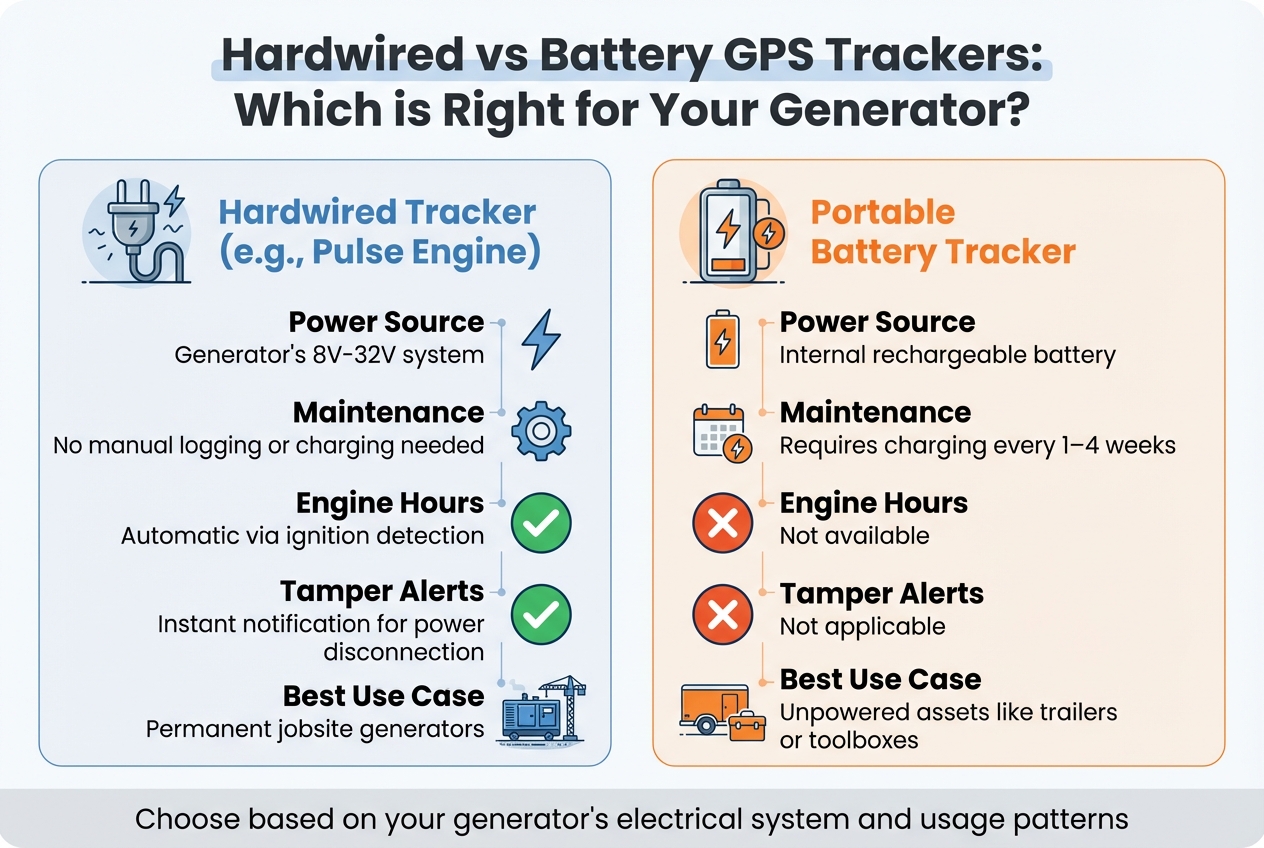
Hardwired vs Battery GPS Trackers for Portable Generators Comparison
Picking the right GPS tracker means focusing on features that genuinely protect your generator, not just flashy extras. Generators often face tough conditions like vibrations, extreme weather, and high engine heat, so not all trackers are up to the task.
Features You Need
The most important feature is real-time location tracking. Look for devices with 4G LTE, 5G, or LTE-M connectivity to ensure you get consistent updates and detailed data. But just knowing where your generator is isn't enough.
Engine hour monitoring sets basic trackers apart from those designed specifically for equipment. Hardwired trackers automatically track runtime by detecting ignition status, which takes the guesswork out of maintenance planning. This ensures your generator gets serviced at the right time - avoiding unnecessary work or costly breakdowns - and simplifies billing for rental businesses.
Power disconnect and tamper alerts are another must-have. These notify you immediately if someone cuts the tracker's wires or disconnects it from the generator’s power source. To keep the tracker running during a power outage, choose one with a backup battery (at least 190 mAh). Additionally, ignition alerts can notify you the moment the generator starts, helping you spot unauthorised use during off-hours.
If your generator is used internationally or across different regions, go for trackers with international eSIM technology to maintain connectivity. For larger fleets, it’s worth choosing a platform that offers API access, so you can integrate location and runtime data into your existing systems seamlessly.
| Feature | Hardwired Tracker (e.g., Pulse Engine) | Portable Battery Tracker |
|---|---|---|
| Power Source | Generator's 8V–32V system | Internal rechargeable battery |
| Maintenance | No manual logging or charging needed | Requires charging every 1–4 weeks |
| Engine Hours | Automatic via ignition detection | Not available |
| Tamper Alerts | Instant notification for power disconnection | Not applicable |
| Best Use Case | Permanent jobsite generators | Unpowered assets like trailers or toolboxes |
Once you've narrowed down the features you need, make sure the tracker is tough enough to handle the conditions it’ll face.
Compatibility and Build Quality
The tracker you choose needs to handle the same rough conditions as your generator. An IP67 waterproof rating is essential to protect it from rain, dust, mud, and even pressure washing. It should also be vibration-resistant and work in a temperature range of -30°C to 80°C, ensuring reliability in extreme weather and during constant mechanical movement.
Electrical compatibility is another key factor - check that your generator’s voltage matches the tracker’s range, which is typically 8V to 32V DC.
For discretion and ease of installation, opt for a compact design (around 8.4 cm × 5.1 cm × 1.7 cm) that can be hidden within the generator’s panels. Trackers without external lights are less likely to be spotted and removed by thieves. If your generator has a built-in electrical system, hardwired trackers are ideal since they don’t need manual recharging and can automatically record engine hours.
Finally, make sure the tracker stays securely in place. Look for models with high-strength magnets or industrial-grade adhesives that can handle transport and rough handling without coming loose.
How to Install a GPS Tracker on a Portable Generator
Getting Ready for Installation
Before diving in, make sure you have the right tools on hand. You'll need a 20V DC multimeter, crimping tool, socket wrench, cable ties, industrial Velcro, or 50–80 lb neodymium magnets, along with alcohol pads, heat-shrink tubing, and dielectric grease.
Safety first: disconnect the generator's starter battery before starting any wiring work. Wait at least 90 seconds for capacitors to discharge. To avoid confusion later, label each wire and test every connection before closing up the panels - this step alone can prevent most installation errors.
Once you're set up and following safety precautions, move on to choosing the right spot to mount the tracker.
Where to Mount the Tracker
Finding the perfect spot for the tracker is key to ensuring reliable performance. Aim for a location that offers a balance of signal visibility, concealment, and protection from heat and vibration. Plastic housings or fibreglass covers are ideal because they don't block GNSS signals, unlike thick metal, which can reduce location accuracy by 10–15 metres.
If you're using magnetic mounts, attaching the tracker to the chassis or frame rail works well, though these areas may collect road grime. Steer clear of heat sources like the muffler, exhaust, alternator, or engine control units, as these can cause interference. Position the antenna so it faces upward or outward, away from heavy metal parts, to maintain a strong satellite connection.
For a stealthy setup, blend the tracker and its wiring into the generator's existing hardware using black wire loom or vinyl wrap.
A recent example showed how a well-hidden tracker enabled quick recovery of a stolen generator, a common concern for those using van tracking for landscape and grounds maintenance.
Once you've picked the right spot, it's time to connect the tracker to a power source.
Connecting Power to the Tracker
A reliable power connection is essential for uninterrupted tracking. Use a multimeter to locate the Constant Power (12V always on), Ignition Power (12V when running), and Ground points. Protect the system with an inline 3–5A fuse, which prevents damage from electrical surges.
For a clean and reversible installation, use fuse taps (add-a-circuit adapters) instead of cutting factory wires. If attaching directly to the battery posts, secure the connection with ring terminals. Apply dielectric grease to exposed terminals to prevent corrosion, and cover all connections with heat-shrink tubing for added durability. Use cable ties and split loom tubing to keep the wiring secure and safe from vibration-related wear. Double-check polarity to ensure proper function and avoid potential damage.
Mounting the Tracker Securely
Before mounting, clean the area thoroughly with rubbing alcohol or automotive degreaser for better adhesion. For hardwired setups, tighten ground bolts to 5–7 N·m to ensure they stay secure. To minimise vibration effects, add foam padding or rubber grommets, which can help reduce wear on the tracker.
Once the tracker is mounted, reconnect the battery and check the LED indicators - green means a GPS lock, and blue indicates power. Reassemble the panels, then test the tracker for 10–15 minutes to confirm it's providing accurate location updates. If the generator is used outdoors, consider placing the tracker in a silicone gasket case or heat-sealed pouch to shield it from rain and oil splashes.
Setting Up and Testing Your GPS Tracker
Configuring Software and Alerts
After installing your GPS tracker, it's important to set up the software to match how your generator will be used. Start by creating geofencing boundaries - typically a radius of 50–100 metres around job sites or premises. These boundaries will trigger alerts if the generator moves outside them, helping you detect unauthorised activity.
Movement alerts are particularly handy for spotting unauthorised movement. Set these alerts specifically for off-hours, such as 18:00–07:00 or weekends. Fine-tune the sensitivity to avoid false alarms caused by minor vibrations.
Modern event-driven tracking systems only send alerts when there's a change in status, which helps conserve both data and battery life. Configure the system to track key details like engine status, runtime, fuel levels, and temperature. For real-time location updates, aim for intervals of 30–60 seconds during active movement - this ensures precise tracking in case recovery is needed.
Once you've configured the software, test the system to make sure everything works as expected.
Testing the System
Testing is essential to confirm that your GPS tracker is functioning properly. Start by checking the LED indicators: a green light indicates a GPS lock, while a blue light confirms connectivity. To test the alerts, move the generator outside the geofence for 10–15 minutes. You should receive an alert within 2–3 minutes.
Avoid testing in areas like underground car parks or multi-storey buildings, as these can disrupt GPS and mobile signals. If your device uses an internal battery, check its status on the tracking platform to ensure it's functioning correctly. Make it a habit to review your geofence settings, alerts, and software updates at least once a month.
If employees will be operating the generator, notify them in writing about the tracking system. Clearly explain what data will be collected and why, ensuring compliance with GDPR regulations.
Daily Use and Maintenance Tips
Regular Maintenance Tasks
Once your tracker is installed and tested, keeping up with daily maintenance is key to ensuring it stays dependable. A quick glance at the LED indicators each time you operate the generator can tell you a lot. A steady light means everything’s working fine, with strong GPS and network connections. Blinking lights, on the other hand, suggest the tracker is struggling to find a signal - this could be due to poor placement or interference.
Don’t ignore those monthly software update notifications. Installing updates promptly keeps your tracker secure and running smoothly. A good idea is to align these updates with the generator’s 30-minute exercise run. This way, you can test the tracker under real-world conditions.
For battery-powered trackers, check the charge levels weekly using your tracking platform. If you’re using a hardwired unit, make sure the generator’s starter battery is charged. Once a month, take a moment to inspect the tracker’s mounting. Vibration can loosen it over time, so it’s worth confirming it’s still secure and discreetly placed.
Handling Alerts and Preventing Tampering
Routine checks are only part of the equation - responding to alerts quickly is just as important. If you receive an alert, investigate straight away to figure out what’s going on. Poor placement, loose connections, or interference from metal components are common culprits behind inaccurate location data. If connectivity issues crop up, try moving the generator to a more open area, away from tall buildings, thick trees, or metal structures that might block signals.
For hardwired trackers, proper connections are a must. Avoid quick fixes like “twist and tape” methods. Instead, opt for crimp connectors or fuse taps for a solid, reliable connection. As GPS tracking expert Ryan Horban puts it:
"A bad crimp today becomes a dead tracker tomorrow".
To stay ahead of tampering, set up tamper alerts to notify you via SMS or email if the device loses power. For extra security, consider using a decoy tracker in a visible spot while keeping the actual unit well-hidden. Finally, take time to inspect the wiring periodically, especially in high-vibration settings. Look for any signs of heat damage, oxidation, or wear and tear that could compromise the system.
Recovering Stolen Generators Using GPS Tracking
What to Do When a Generator Is Stolen
If your generator goes missing, time is of the essence. Professional recovery teams are on standby 24/7 to respond to theft alerts, giving you the best chance of retrieval. Start by checking your tracking platform for the generator’s current location and movement history. Once you’ve confirmed it’s been stolen, contact your local police immediately and provide them with the exact GPS coordinates and movement details. For your safety, it’s crucial not to attempt recovering the generator on your own.
If you have access to recovery support services, escalate the situation straight away. These experts act as a bridge between your business and law enforcement, ensuring all tracking data - such as timestamps, location history, and movement alerts - is managed correctly. They also take the lead in coordinating the recovery process and assist in documenting the incident for your insurance claim.
Using Recovery Support Services
Real-time alerts and precise location data are key to launching recovery efforts quickly. Beyond notifying the police, professional recovery services handle all communication with law enforcement and ensure your equipment is safely located.
One example is GRS Fleet Telematics, which specialises in recovery support for tracked assets and boasts a 91% recovery rate for stolen vehicles and equipment. Their service doesn’t stop at recovery - they also conduct post-recovery inspections to identify any damage and offer security advice to help prevent future thefts.
With hardware options starting at £35 for Essential tracking and going up to £99 for Ultimate security, which includes dual-tracker technology and immobilisation, you can choose the level of protection that suits your generator’s value and risk exposure. Besides aiding in recovery, GPS tracking can help cut replacement costs and keep your insurance premiums under control.
Conclusion
GPS tracking transforms how portable generators are secured and managed. By following this guide, you can better protect your generators, streamline operations, and significantly reduce the risk of theft.
With portable generators costing anywhere from £500 to over £5,000, theft is a serious financial threat. For businesses managing multiple units, tracking 10 generators costs about £960 per year - a small investment compared to potential losses that can exceed £10,000 from just one theft. In 2024, thefts on UK construction sites increased by 20%, with generators being prime targets. However, assets equipped with GPS tracking experience 85% fewer losses. Recovering even one stolen generator could cover years of tracking expenses.
GPS tracking offers more than just security; it provides actionable data to improve operations. You can monitor equipment usage, cut idle time, and schedule maintenance based on actual usage hours. These insights can even prevent unauthorised use. Many businesses have reported savings of up to 25% on fuel costs through more efficient fleet management. Additionally, tracking can help lower replacement expenses and may even reduce insurance premiums.
Start by auditing your fleet to pinpoint high-value or frequently moved units that would benefit most from tracking. Analyse your installation and testing outcomes to prioritise which generators need immediate tracking and extra security measures. Speak with your insurance provider to see if GPS tracking qualifies for premium discounts - several UK insurers recognise dual-tracker systems and professional recovery services as effective ways to reduce risks. Establish theft and location benchmarks, then reassess after 90 days to measure your return on investment.
For the best results, combine GPS tracking with secure storage solutions and clear operational protocols. As you gain experience, you can explore advanced features like geofencing alerts, usage analytics, and integration with broader fleet management systems to maximise your investment's impact.
If you're ready to secure your portable generators, GRS Fleet Telematics offers reliable solutions, with hardware starting at £35 and subscriptions from £7.99 per month. Their 91% recovery rate for stolen assets makes them a trusted choice for UK businesses looking to protect their equipment.
FAQs
Where should I hide a GPS tracker on a generator for best signal?
For the best signal, position the GPS tracker in a hidden spot that still allows good satellite reception. A good option is to place it under or inside a covered part of the generator, like behind panels or within the frame, to keep it safe from theft or interference. Steer clear of locations blocked by metal or heavy materials, and make sure the tracker has an unobstructed view of the sky for precise tracking.
Do I need a hardwired tracker, or will a battery one do?
A battery-powered tracker works well for temporary or leased vehicles. It's portable, simple to set up, and can be moved between vehicles effortlessly.
On the other hand, a hardwired tracker is better suited for long-term use or high-value assets. Since it connects directly to the vehicle's power supply, it ensures uninterrupted operation. It's also less noticeable, offers added security, and supports advanced features like remote immobilisation and tamper resistance. This makes it a reliable choice for fleets or permanent installations.
Will GPS tracking affect my insurance or GDPR compliance?
GPS tracking can help lower insurance premiums by enhancing vehicle security and deterring theft. However, to comply with GDPR regulations, it's crucial to focus on correct installation, secure data management, and clear communication with individuals about how their data will be used. These steps ensure privacy is safeguarded while making the most of GPS tracking's advantages.